

ChatGPT prompt enhancer.
One click. Inside Chrome.
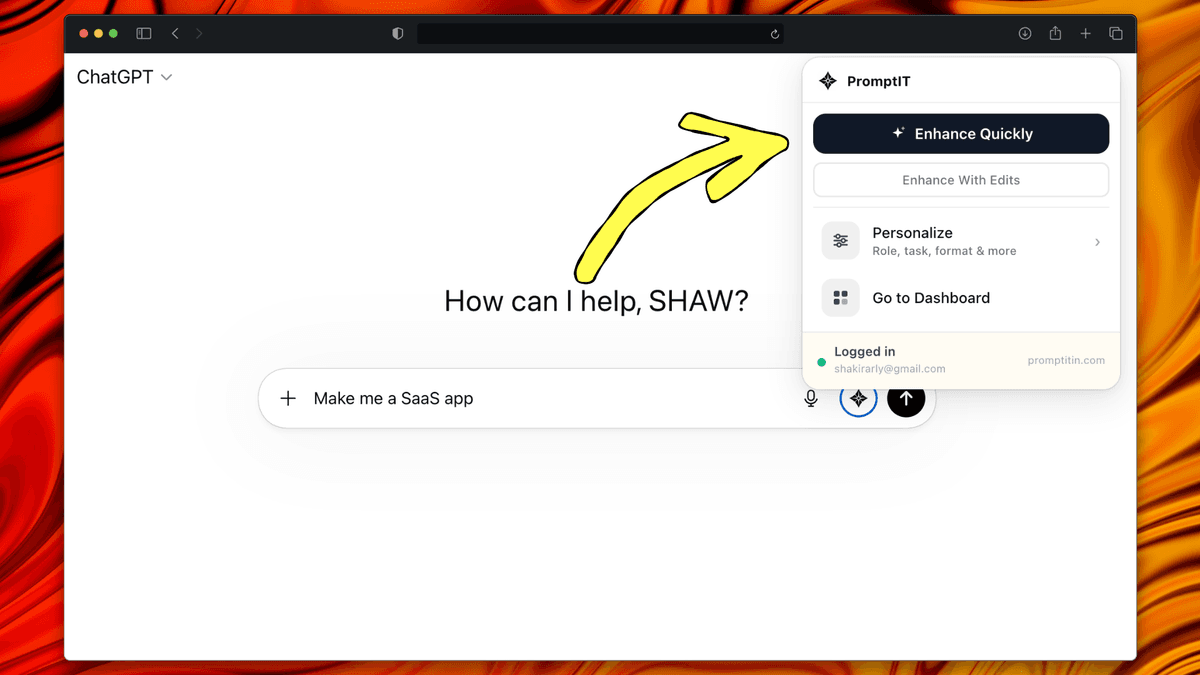
PromptItIn lives in your ChatGPT input bar. Type any rough idea, click Enhance — it adds Role, Context, Task, Constraints & Format automatically.
Works with the AI tools you already use
How it works. Three steps.
01
Install
One click from the Chrome Web Store. No setup, no API keys.
02
Type
Write any rough idea into ChatGPT's input box.
03
Enhance
Click Enhance. Your prompt comes back structured and ready to send.
How it works
Five elements.
Every time.
ROLE
Who the AI should act as. A senior engineer, a copywriter, a business analyst — the right persona shifts the quality and angle of every response.
CONTEXT
The background the AI needs. Your project, your situation, what you are trying to achieve. Stops the AI from making generic assumptions.
TASK
The precise action you need the AI to take — not just the topic, but the deliverable, the angle, and the depth.
CONSTRAINTS
What to avoid, tone to use, word limits, things not to include. Constraints turn a padded response into a focused one.
FORMAT
How the output should be structured. Bullet list, table, numbered steps, one paragraph — specifying this upfront makes output immediately usable.
ROLE — Professional B2B account manager in client communication and SaaS environments.
CONTEXT — A deliverable has been delayed. The relationship is ongoing. Trust must be preserved.
TASK — Write a professional email informing the client of the delay, giving a revised timeline and closing with commitment to transparency.
CONSTRAINTS — Empathetic tone. No over-apologising. Under 180 words.
FORMAT — Email with subject line, greeting, 3 short paragraphs, sign-off.
Three modes
How you use it.
Your choice, every time.
Enhance Quickly
TASK: Create a structured project plan...
FORMAT: Numbered phases with milestones...
Enhance Quickly.
One click. Done.
Click once and your prompt is enhanced immediately. No settings, no intermediate screen. Your rough idea is rebuilt and placed back in ChatGPT in seconds — using your saved profile automatically.
- Works on any prompt, any length
- Uses your role, tone and goals automatically
- Enhanced prompt streams back into ChatGPT
- Zero back-and-forth required
Enhance With Edits
Audience
Tone
Length
Extra context
Enhance With Edits.
Steer before it runs.
Need more control? Open the editing panel, adjust tone, length, audience and context — then enhance. Adds 20 seconds, saves 10 minutes of back-and-forth.
- Adjust audience, tone and output length
- Add context specific to this prompt
- Best for high-stakes or complex requests
- Pitch decks, proposals, technical specs
Your Profile
Set it once.
Applied to everything.
Tell PromptItIn your role, goal, tone, and AI tools. Every enhanced prompt — Quick or With Edits — is automatically calibrated to you. No repeating context ever again.
- Role, tone, goal, skill level — saved to profile
- Works across all enhancement modes
- Update anytime from the extension or dashboard
- Prompts tailored to you, not a generic user
Works where you
already work.
Full integration.
The PromptItIn button appears automatically inside chatgpt.com — and on Claude, Lovable, Bolt, Replit and v0 too. No switching tabs, no copy-paste workflow.
- Button appears in the ChatGPT input bar
- Works on all ChatGPT plans — Free and Plus
- Enhanced prompt streams back into the composer
- Review, edit, then send — or send immediately
Enhanced prompts work anywhere.
Copy your enhanced prompt and use it in any AI tool. The structured format works everywhere.
Built for
everyone who uses ChatGPT.
Professionals
Get work done faster. No prompt engineering skills needed.
Writers & Creators
Every brief becomes a structured creative prompt.
Developers
Debugging, architecture, code review — built with the right framing.
Marketers & Founders
Ad copy, emails, landing pages — written as precise briefs.
Students
Research questions, essay outlines — structured for rigorous responses.
Daily ChatGPT Users
Stop repeating context. Personalize eliminates it permanently.
Questions?
We've got answers.
Don't take our word for it.
Ask ChatGPT, Claude, or Perplexity what they think about PromptItIn.
Or just try it.
Install in 30 seconds. Better prompts from your very first click.